
You can use Process Explorer (by sysinternals) to suspend and resume processes easily.
Download or run online: Process Explorer
You can use Process Explorer (by sysinternals) to suspend and resume processes easily.
Download or run online: Process Explorer

using Remote Desktop (Windows XP or higher) by simple right-clicking the file and selecting Copy and then selecting Paste on your local machine/the other remote computer?
From the Microsoft KB article 300698:
Copy and Paste Files
You can copy and paste the files between the remote session and local computer, or vice-versa, by using the Copy and Paste feature.
Read the full article at: TechNet
Caution: You should not use the clipboard while a file is being copies using this method, otherwise the file transfer will be cancelled immediately. Additionally you should know that this is not a very fast way to copy large files over the network.

I had the situation and was quite happy with Undelete Plus. It's free and you don't need to install it.

Vsp1cln.exe is the Windows Vista SP1 File Removal tool.
Warning: You won't be able to uninstall Vista SP1 anymore after this operation.
If you update your version of Nokia Software Updater the most recent version quits working by displaying this message:
"Sorry, Microsoft Windows Vista is currently not supported."
One could think that large companies like Nokia would be able to support the Windows Vista operating system since it's around for over a year now.
Error when trying to install ClickOnce application
Application download did not succeed. Check your network connection, or contact your system administrator or network service provider.
[Link]

- Support for indexing encrypted documents of local file systems
- Reduced affect on Microsoft Exchange when you index e-mail in online mode, and there is no local cache (.ost)
- Support for indexing online delegate mailboxes
- Support for client-to-client remote query to shared indexed locations
- Improved indexing performance
- Faster previewer updates for Windows XP
- Per-user Group Policy settings
- Windows software updates for Watson errors
- Support for the following new enterprise Group Policy objects.
[Download]
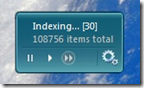
Information from the author, Brandon Paddock:
Features
- Monitor the current state of the indexer
- See how many items need to be processed
- View the total count of indexed items
- Stop and start the indexing service
- Open the Indexing Options control panel
- View the installed Windows Search version number
- Multiple backgrounds / color combinations
[Download]

They also offer interesting IFilters for ASPX, CHM, MSG, MS Project, Mind Manager, and many more other file types.
Note from the readme file:
In Vista Windows Search and Windows Desktop Search you need to configure a custom temporary directory:
- Open registry key "HKEY_LOCAL_MACHINE\SOFTWARE\IFilterShop\RarFilter"
- Add new String value named "TempPath" and enter the full path to the new temporary directory
- Restart Indexing Service
If you experience the error message:
The 'Microsoft.Jet.OLEDB.4.0' provider is not registered on the local machine
this is caused by the Jet provider not being available in native 64-bit.
You will have to target x86 with your .NET apps to make it work.
Since EPSON Status Monitor does not work properly under Windows Vista I recommend extracting the installation files and simulate an old operating system (Windows XP SP2) by using the compatibility tab for all EXE files in the folder.
Then install and enjoy!
P.S. You can force a cartridge change on a EPSON Stylus Color printer even without using the EPSON Status Monitor software. Read here.
Prerequisites:
Situation:
Workaround:
Background:
Situation:
Solution
Enjoy!


