In case you wondered, 3D Pinball for Windows, aka Space Cadet, (which was introduced in Microsoft Plus 95 and part of Windows NT 4 by default) works great on Windows 8.
Showing posts with label Download Tips. Show all posts
Showing posts with label Download Tips. Show all posts
Thursday, December 27, 2012


Monday, August 16, 2010
Download Tip: Create Regular Expressions in a snap
I have almost no clue about Regular Expressions, but still I can create even pretty complex RegEx patterns in a snap and therefore can impress collegues with those (almost non-existant) skills.
How do I do that, you will ask?
Well, I use Expresso Regular Expression Tool
It's free (although you have to register after a period to receive your free registration code) and helped me a lot. Highly Recommended!

Tuesday, September 15, 2009
Control multiple computers with a single keyboard and mouse

What the author says:
“Input Director is a Windows application that lets you control multiple Windows systems using the keyboard/mouse attached to one computer.”
Saturday, April 4, 2009
Converting Virtual PC virtual machines to VMware
The most reliable way to convert your Virtual PC/Virtual Server/Hyper-V virtual machines to VMware is to use the "VMware vCenter Converter" (available free of charge).

Friday, February 6, 2009
ERROR: Your client does not support opening this list with Windows Explorer
When trying to switch to "Explorer View" or open a SharePoint document library in Windows Explorer and receive the following error message:

How to fix
Install: Software Update for Web Folders (KB907306)
More information: KB907306
Thursday, August 7, 2008
Undelete Files with the free Undelete Plus

I had the situation and was quite happy with Undelete Plus. It's free and you don't need to install it.
Saturday, July 12, 2008

Sunday, June 29, 2008
Increasing the speed of Windows Search indexer by updating to version 4.0

- Support for indexing encrypted documents of local file systems
- Reduced affect on Microsoft Exchange when you index e-mail in online mode, and there is no local cache (.ost)
- Support for indexing online delegate mailboxes
- Support for client-to-client remote query to shared indexed locations
- Improved indexing performance
- Faster previewer updates for Windows XP
- Per-user Group Policy settings
- Windows software updates for Watson errors
- Support for the following new enterprise Group Policy objects.
[Download]
Monday, June 9, 2008
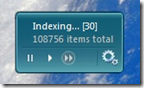
Sidebar Gadget to monitor and control the Windows Search indexer
Information from the author, Brandon Paddock:
Features
- Monitor the current state of the indexer
- See how many items need to be processed
- View the total count of indexed items
- Stop and start the indexing service
- Open the Indexing Options control panel
- View the installed Windows Search version number
- Multiple backgrounds / color combinations

[Download]
[IFilter] Indexing contents of RAR files

They also offer interesting IFilters for ASPX, CHM, MSG, MS Project, Mind Manager, and many more other file types.
Note from the readme file:
In Vista Windows Search and Windows Desktop Search you need to configure a custom temporary directory:
- Open registry key "HKEY_LOCAL_MACHINE\SOFTWARE\IFilterShop\RarFilter"
- Add new String value named "TempPath" and enter the full path to the new temporary directory
- Restart Indexing Service
Wednesday, November 1, 2006
Synchronize your files and folders with SyncToy for Windows XP and Vista
SyncToy [1] is a free PowerToy for Microsoft Windows XP and Vista that provides an easy to use, highly customizable program that helps users to do the heavy lifting involved with the copying, moving, and synchronization of different directories. Most common operations can be performed with just a few clicks of the mouse, and additional customization is available without adding complexity. SyncToy can manage multiple sets of directories at the same time; it can combine files from two folders in one case, and mimic renames and deletes in another. Unlike other applications, SyncToy keeps track of renames to files and will make sure those changes get carried over to the synchronized folder.
[1] Download: http://www.microsoft.com/downloads/details.aspx?FamilyID=e0fc1154-c975-4814-9649-cce41af06eb7&displaylang=en
[2] Article: Synchronizing Images and Files in Windows XP Using Microsoft SyncToy
Updated: for SyncToy V1.4 for Windows XP and Vista (based on .NET Framework 2.0)
Tuesday, October 31, 2006
Pimped by Windows Live Writer
Read about it, downloaded it, added plug-ins from here, here and here, and love it. :-)
Monday, October 30, 2006
Configure the Windows Vista bootloader with ease using EasyBCE
EasyBCD is a must-have tool for Windows Vista to manage the new bootloader:

Saturday, August 6, 2005
File replication with ROBOCOPY - Robust File Copy for Windows
Robocopy is a 32-bit command-line tool used for file replication. This tool helps maintain identical copies of a directory structure on a single computer or in separate network locations. Robocopy is included in the Microsoft® Windows® Resource Kit. (Update: Robocopy is already included in Windows Vista and higher.)

- Download
- Robocopy FAQ
- Robocopy GUI
- Article: Real-World Scripting: Data Migration with Robocopy, Part 1
- Article: Real-World Scripting: Data Migration with Robocopy, Part 2
- KB 323275: How to Use Robocopy to Copy Security Information Without Copying Any File Data
- Feature Comparison XXCOPY vs ROBOCOPY
- How to synchronize two Windows computers
Subscribe to:
Posts (Atom)


