Saturday, February 21, 2009

Unable to save to favorites folder in Windows Vista (Unspecified Error in IE7)

IE7 runs in low integrity level under Windows Vista Problem description:

When attempting to add a favorite in Internet Explorer you receive an "Unspecified Error".

Unspecified Error when trying to save to favorite folder in Windows Vista

Solution:

Equipped with administrative privileges change the integrity level of your favorites folder to low (as explained here) by typing:

icacls favorites /setintegritylevel (OI)(CI)low

Friday, February 20, 2009

Dell SAS RAID Storage Manager: what's the user name to log on?

Dell SAS RAID Storage Manager login screen (German version)After launching Dell SAS RAID Storage Manager it asks you for enter a username and password combination.

What it expects is the username and password of a Windows account with administrative privileges.

Saturday, February 7, 2009

Welcome to my new Treasury

After over 5 years I really had to leave dotnetjunkies for several reasons and moved my "Treasury" to this new and beautiful place.
I now maintain three blogs – you can reach them consistently at www.nenoloje.de/blogs:
  • Neno Loje's Treasury [RSS]
    My primary weblog about diverse topics that make the life of a developer easier: .NET, ClickOnce deployment and Windows Development. In English.
  • TFS & Visual Studio ALM Blog [RSS]
    My technical blog exclusively about Microsoft's Application Lifecycle Management (ALM) platform: Visual Studio (VS) and Team Foundation Server (TFS). In English.
  • Neno Loje’s Futterkiste [RSS]
    My German language blog with information specific to the German-speaking area, like local events and conferences.
Enjoy reading!

Friday, February 6, 2009

ERROR: Your client does not support opening this list with Windows Explorer

When trying to switch to "Explorer View" or open a SharePoint document library in Windows Explorer and receive the following error message:

Client

How to fix

Install: Software Update for Web Folders (KB907306)

More information: KB907306

Sunday, January 4, 2009

Shortcuts for Full Screen Mode

F11 - it's not always as easy to switch to full screen mode Full screen, please! But how? Well, it depends...

Program

Shortcut

Remote Desktop
Terminal Services Client
Hyper-V VM Connection

[Ctrl]+[Alt]+[Break]

Visual Studio

[Shift]+[Alt]+[Enter]

Internet Explorer & Windows Explorer

F11

Windows Media Player

[Alt]+Enter or F11

VMware Workstation

[Ctrl]+[Alt]+[Enter]

Thursday, December 18, 2008

Tip: A process using a lot CPU time? Suspend it.

Suspend running process using Process Explorer from sysinternalsDid you know that you can suspend a running process temporarily so you can focus on something different and resume it later, so that it doesn't steel your CPU time while you are working on something else?

You can use Process Explorer (by sysinternals) to suspend and resume processes easily.

Download or run online: Process Explorer

Sunday, August 17, 2008

[Remote Desktop] Quickly copying files when using Remote Desktop

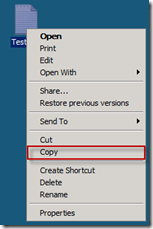
Rightclick > Copy  Did you know that you can copy files from:

  • a remote computer to your local computer or
  • a remote computer to another remote computer

using Remote Desktop (Windows XP or higher) by simple right-clicking the file and selecting Copy and then selecting Paste on your local machine/the other remote computer?
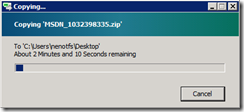
Copying from desktop to Remote Desktop and vice versa

From the Microsoft KB article 300698:

Copy and Paste Files
You can copy and paste the files between the remote session and local computer, or vice-versa, by using the Copy and Paste feature.

Read the full article at: TechNet

Caution: You should not use the clipboard while a file is being copies using this method, otherwise the file transfer will be cancelled immediately. Additionally you should know that this is not a very fast way to copy large files over the network.

Thursday, August 7, 2008

Undelete Files with the free Undelete Plus

portable-undelete-plus-297You urgently need a tool to undelete files you accidentally deleted?

I had the situation and was quite happy with Undelete Plus. It's free and you don't need to install it.

Wednesday, July 30, 2008

Save space: Remove the Vista SP1 uninstallation files

WIndows Vista Service Pack 1 Start » Run » Vsp1cln.exe

Vsp1cln.exe is the Windows Vista SP1 File Removal tool.

Warning: You won't be able to uninstall Vista SP1 anymore after this operation.

Saturday, July 12, 2008

IFilter for enabling PDF full-text search on 64-bit Windows Vista

Foxit 64-bit PDF IFilter Not Microsoft. Not Adobe. But Foxit.

Read about it: here.

Download it: here.

Nokia Software Updater: 'Sorry, Microsoft Windows Vista is currently not supported.'

If you update your version of Nokia Software Updater the most recent version quits working by displaying this message:

"Sorry, Microsoft Windows Vista is currently not supported."

One could think that large companies like Nokia would be able to support the Windows Vista operating system since it's around for over a year now.

Sunday, July 6, 2008

Error on ClickOnce install: Application download did not succeed. Check your network connection, or contact your system administrator or network service provider.

Error when trying to install ClickOnce application

Application download did not succeed. Check your network connection, or contact your system administrator or network service provider.

[Link]

Sunday, June 29, 2008

Increasing the speed of Windows Search indexer by updating to version 4.0

Update to Windows Search 4.0Windows Search 4.0 includes the following improvements:

  • Support for indexing encrypted documents of local file systems
  • Reduced affect on Microsoft Exchange when you index e-mail in online mode, and there is no local cache (.ost)
  • Support for indexing online delegate mailboxes
  • Support for client-to-client remote query to shared indexed locations
  • Improved indexing performance
  • Faster previewer updates for Windows XP
  • Per-user Group Policy settings
  • Windows software updates for Watson errors
  • Support for the following new enterprise Group Policy objects.

[Download]

Monday, June 9, 2008

Sidebar Gadget to monitor and control the Windows Search indexer

Information from the author, Brandon Paddock:

Features

  • Monitor the current state of the indexer
  • See how many items need to be processed
  • View the total count of indexed items
  • Stop and start the indexing service
  • Open the Indexing Options control panel
  • View the installed Windows Search version number
  • Multiple backgrounds / color combinations

untitled

[Download]

[IFilter] Indexing contents of RAR files

RAR IFilter from IFilterShop I'm using this RAR IFilter from the IFilterShop.com (free for non-commercial users) and my RAR files are now indexed including the contents.

They also offer interesting IFilters for ASPX, CHM, MSG, MS Project, Mind Manager, and many more other file types.

Note from the readme file:

In Vista Windows Search and Windows Desktop Search you need to configure a custom temporary directory:

  1. Open registry key "HKEY_LOCAL_MACHINE\SOFTWARE\IFilterShop\RarFilter"
  2. Add new String value named "TempPath" and enter the full path to the new temporary directory
  3. Restart Indexing Service